What is a managed SOC?
A managed SOC — or SOC as a service (SOCaaS) — gives growing businesses 24/7 threat detection and response without an in-house security operations center.

- A managed SOC (Security Operations Center) — also called SOC as a service, or SOCaaS — is an outside team and platform that watches your systems for cyber threats around the clock, so you don't have to staff a security operations center yourself.
- It combines continuous monitoring, threat detection, alert triage, and incident response, turning a flood of raw signals into a short list of things that actually matter.
- The ones worth paying for don't just forward alerts — they investigate, respond, and give you a single place you can actually see and audit.
In this article
- What does SOC stand for?
- What is a managed SOC?
- What a managed SOC actually does
- Continuous monitoring and log collection
- Threat detection and threat hunting
- Alert triage
- Incident response
- What threats does a managed SOC protect against?
- Why a managed SOC beats buying more tools
- Managed SOC vs. in-house SOC
- Managed SOC vs. MSSP vs. MDR
- How to choose a managed SOC provider
- What does a managed SOC cost?
- How Mahoney Control approaches managed SOC
- Frequently asked questions
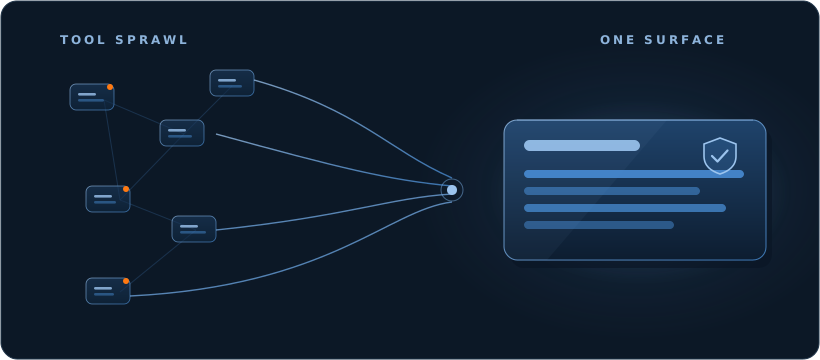
Most companies don’t get breached for lack of a security tool. They get breached because the tools they already own sit in half a dozen disconnected windows, throw off thousands of alerts a day, and nobody is watching them at 2 a.m. When something finally does surface, no one can see the whole picture in time to act.
A managed SOC exists to close that gap. Done right, it doesn’t add another product to the pile — it gives you one place where your security is genuinely watched, understood, and acted on, around the clock. Done wrong, it’s an expensive alert forwarder.
This guide explains what a managed SOC is, how it works, how it stacks up against the alternatives, and how to tell a real one from the rest.
What does SOC stand for?
SOC stands for Security Operations Center — the control room for your organization’s cybersecurity. It’s the combination of people, processes, and technology whose only job is to detect, investigate, and stop threats to your systems and data.
One thing to clear up first: a Security Operations Center is not the same as SOC 2. SOC 2 is an auditing standard for how a company handles data — same three letters, unrelated meaning. This article is about the Security Operations Center.
What is a managed SOC?
A managed SOC is a security operations center you don’t run yourself. Rather than hiring, training, and rostering your own security team 24 hours a day, you hand that to a provider who delivers the SOC as a service — usually shortened to SOCaaS, and sometimes called an outsourced SOC, an external SOC, or simply a managed SOC service. They bring the technology, the SOC analysts, and the process; you get the protection without the headcount.
Standing up an in-house SOC means recruiting scarce specialists, buying and wiring together a stack of security tools, and covering every night, weekend, and holiday. For most growing businesses that math never works. A managed SOC makes the same capability a predictable line item instead of a hiring project.
It usually comes in one of two shapes: a fully managed SOC, where the provider runs detection and response end to end, or a co-managed SOC, where they work alongside your existing team and take the shifts you can’t. Either way the promise is the same — continuous security monitoring and a clear response process, without the cost of a traditional, in-house SOC.
What a managed SOC actually does
Strip away the marketing and a managed SOC does one core thing: it takes the overwhelming daily volume of raw signals and filters it down to the few things that actually need a human decision.
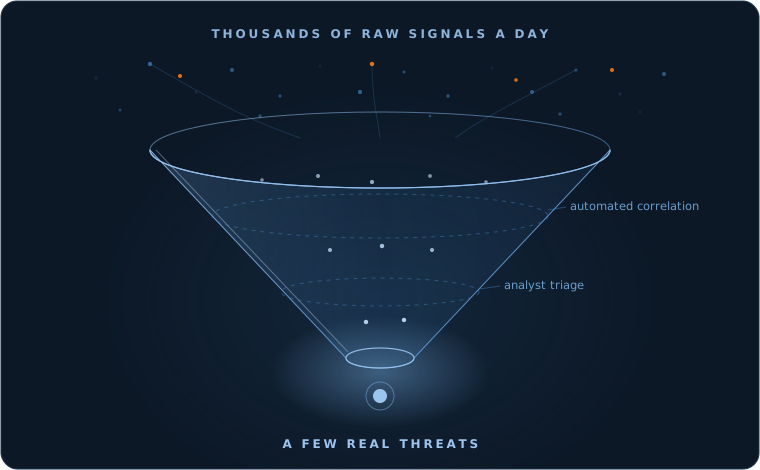
Getting from the top of that funnel to the bottom takes four connected functions.
Continuous monitoring and log collection
Your laptops, servers, cloud services, and network produce a constant stream of activity logs and security events. A managed SOC collects and watches all of it without pause — usually feeding it into a SIEM (security information and event management) platform so signals from everywhere land in one place. No overnight gap where logs pile up unread.
Threat detection and threat hunting
Collecting data is easy; telling an attack apart from normal noise is the hard part. The platform correlates signals across your environment and uses automated analysis and threat intelligence to flag the patterns that look malicious. SOC analysts then go further with threat hunting — actively looking for attackers who’ve learned to slip past the rules. Together, that’s what the industry calls detection and response.
Alert triage
A typical environment generates thousands of alerts, and the overwhelming majority are noise. Triage is the unglamorous, decisive work of separating the few real threats from the many false positives. It’s also where most security tooling quietly fails: buy an EDR or a SIEM and you’ve bought the alerts, not the person who reads them at 3 a.m.
Incident response
When something real surfaces, there has to be a practiced plan: contain it, limit the damage, and get the affected systems back to a safe state. One common measure is mean time to respond (MTTR) — how long it takes to contain an incident once it’s detected. A managed SOC’s job isn’t to send you a notification that something’s wrong. It’s to act.
Behind these four functions sits a stack of security tools the provider runs so you don’t have to: a SIEM to correlate logs, EDR and XDR (endpoint and extended detection and response) to watch endpoints and tie signals together, SOAR to automate routine response, and threat intelligence to stay current. The tools matter — but the value is the people and process running them together.
What threats does a managed SOC protect against?
A managed SOC isn’t tuned for one kind of attack; it watches for the full range a modern business faces — ransomware that encrypts your data, phishing and account takeover that walk in with stolen credentials, malware and intrusions, insider misuse, and the quiet anomalies that signal someone probing an unpatched vulnerability. Because monitoring never stops and signals are correlated, these tend to surface while they’re still small, not after the damage is done.
Why a managed SOC beats buying more tools
It’s tempting to answer a security gap by buying another product. The problem is that tools don’t watch themselves. Every new tool adds another console, another stream of alerts, and another thing nobody has time to monitor — the “tool sprawl” that leaves teams busier but not safer.
A managed SOC inverts that. Instead of more software, you get coverage: someone watching around the clock, the expertise to judge what’s real, and a response when it counts — at a predictable cost rather than the open-ended expense of an in-house team. The strongest ones also pull your scattered signals into one view, so security stops being a black box and becomes something you can actually see.
Managed SOC vs. in-house SOC
Building your own SOC makes sense for very large organizations with the budget and headcount to sustain it. For everyone else, the numbers rarely add up: covering 24/7 with no gaps takes a full rotating team, the security tools to back them, and the constant fight to retain scarce talent. A managed SOC delivers comparable coverage without carrying that weight — which is why SOC as a service has become the default for companies that take security seriously but don’t run a large internal security department.
Managed SOC vs. MSSP vs. MDR
These three get used interchangeably, which is where a lot of confusion starts. Here’s the distinction that matters:
| Capability | MSSP | MDR | Managed SOC |
|---|---|---|---|
| 24/7 monitoring | Yes | Yes | Yes |
| Investigates & triages alerts | Varies | Yes | Yes |
| Actively responds to threats | Varies | Yes | Yes |
| Coverage | Security devices | A defined toolset | Your environment |
In plain terms: an MSSP manages security devices and forwards alerts, but often leaves the investigating and responding to you. MDR focuses on detecting and responding, usually around a fixed set of tools. A managed SOC (SOCaaS) covers the full security operations function — monitoring, detection, triage, and response — across your environment. (You’ll also hear XDR, extended detection and response: that’s a technology for unifying signals, not a competing service.)
How to choose a managed SOC provider
The fastest way to tell a real managed SOC from an alert forwarder is to ignore the feature list and ask harder questions:
- Do they actually respond, or only alert? This is the line between a SOC and a notification service.
- Is the coverage genuinely 24/7, year-round — including the nights and weekends attackers prefer?
- What’s written into the SLA? Commitments belong in the contract, not the brochure.
- Does it fit your stack — your existing security tools, cloud, and hybrid setup — or does it demand a rip-and-replace?
- Can you see what’s happening, or is it a black box you have to trust on faith?
That last question matters more than most buyers realize. If you can’t see your own security — and produce the evidence when an auditor or your board asks — you don’t really have control of it.
What does a managed SOC cost?
There’s no single number, and any provider who quotes one before understanding your environment is guessing. Cost tracks the size of your environment (users and endpoints), how much data you generate and retain, how much of the response you hand over, and your compliance scope. What matters is the shape: a managed SOC replaces large, lumpy capital spending — tools, hiring, 24/7 staffing — with a predictable, recurring service. For most growing businesses that’s more predictable — and usually more cost-effective — than building the same thing in-house. (You can see how we structure it on our pricing page.)
How Mahoney Control approaches managed SOC
Our view is simple: you shouldn’t have to choose between being protected and being able to see your own security. Most providers give you one or the other — coverage you can’t inspect, or dashboards no one watches.
Mahoney Control — by Mahoney IT — is built to collapse that trade-off. Instead of juggling a separate RMM, EDR, SIEM, and cloud consoles, the platform pulls those signals onto a single surface, correlates them, and applies automated analysis to surface what matters — with SOC analysts who investigate and respond to what it finds. Every incident stays tied to the raw event log behind it, so what happened is transparent and audit-ready rather than a black box. Stop managing tools; start seeing your surface.
You can read more on our Security Operations page.
Frequently asked questions
What does a managed SOC do? It continuously monitors your systems, detects and investigates threats, triages alerts to cut the noise, and responds to real incidents — the full work of a security operations center, delivered as a service.
How much does a managed SOC cost? It depends on the size of your environment, your data volume, how much response you hand over, and your compliance needs. Through a managed SOC it’s a predictable, recurring service — far less than hiring and running a round-the-clock team in-house.
What’s the difference between a managed SOC and an MSSP? An MSSP typically manages security devices and forwards alerts but doesn’t always investigate or respond. A managed SOC delivers the full function — monitoring, detection, triage, and response — so threats get acted on, not just flagged.
Do I need a managed SOC if I already have a SIEM or EDR? Usually, yes. A SIEM or EDR produces signals; it doesn’t watch them around the clock, separate real threats from false positives, or respond. A managed SOC is the people and process behind the tools.
Can a managed SOC work with my existing tools? A good one is designed to. SOC as a service should integrate with your current security tools, cloud, and hybrid environment rather than force a replacement.
If you’d like to see what a managed SOC would look like for your organization, request a no-obligation security assessment.